OPEN SOURCE · MIT

See what changed.
Know why.

Visual regression testing that explains itself: every screenshot is paired with a DOM snapshot and layered analysis, so a diff arrives as a verdict — "style-only change on button.cta", "likely render noise" — not a wall of red pixels. MIT-licensed. Runs entirely on your machine.

Get Started on GitHub — Free See a Live Report
npm i -D @testivai/witness-playwright
Already using Playwright's toHaveScreenshot()? Here's the honest comparison →
On Selenium, where there's no built-in? What this replaces in a hand-rolled setup →
Playwright · WebdriverIO · Selenium · Python · Java · Ruby MIT licensed Runs entirely on your machine
Example

The report.

From the example repo's CI: a style-only-change verdict, six selector-attributed regions, and a heatmap diff.
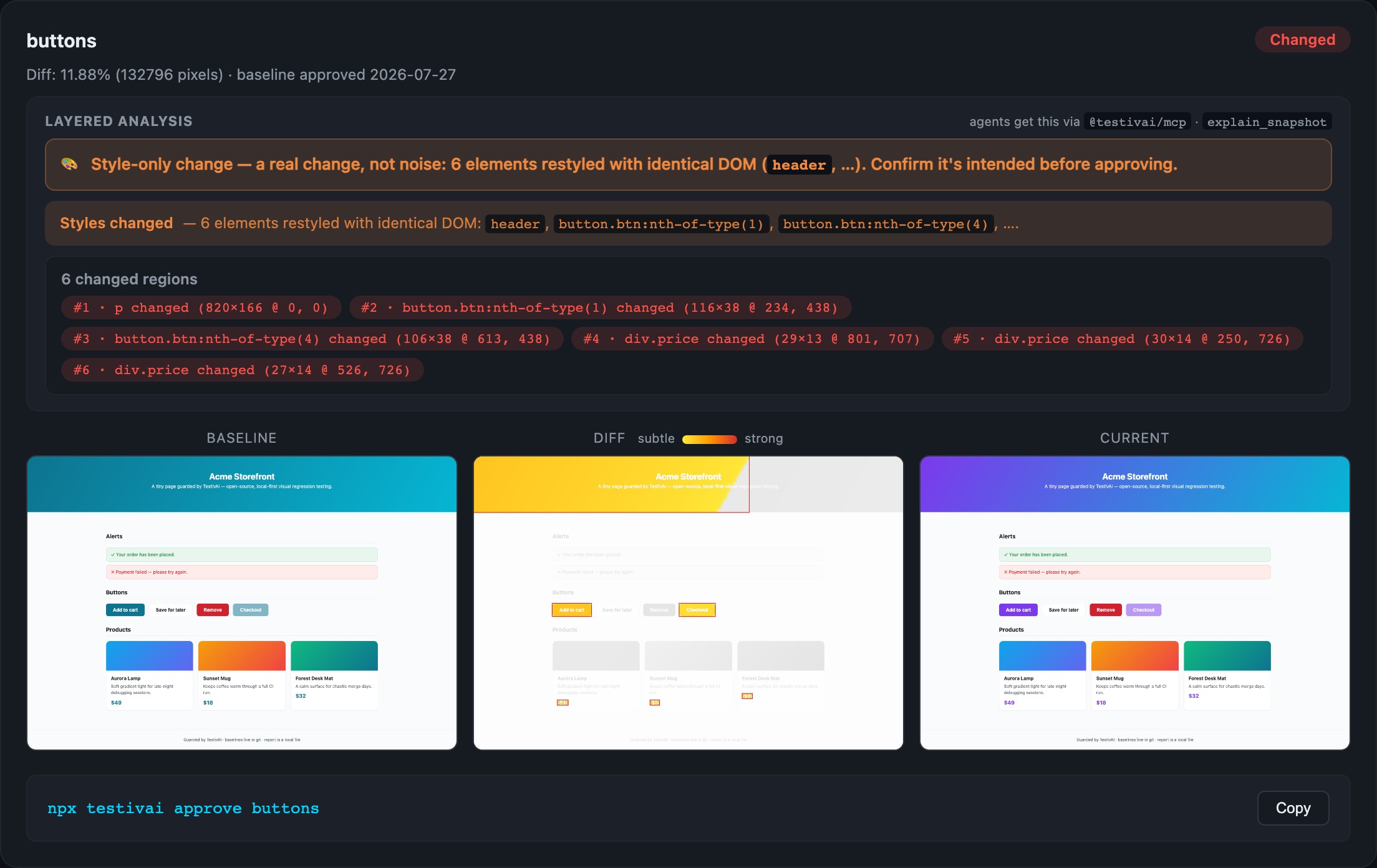
Real TestivAI report: style-only-change verdict, six selector-attributed regions, heatmap diff between baseline and current

Click to open the live report — regenerated by CI, no signup.

Already on Playwright?

Keep toHaveScreenshot()
until it stops answering you.

Playwright's built-in screenshot assertion is good. It retries until the page is stable, disables animations by default, and stores per-browser baselines. If a pixel diff tells you what you need, use it — we'd rather you did than install something you don't need.

Here is where a pixel diff stops being the answer:

"0.4% of pixels differ"
Tells you that it changed. TestivAI pairs the screenshot with the DOM and computed styles, so the verdict reads "style-only change — 34 elements restyled, DOM identical", with each region attributed to a CSS selector.
One line added, forty snapshots red
A pixel differ sees dozens of failures. TestivAI recognises the same elements moved down together, reports one page shift, and passes them when it's within your tolerance.
Approving with a local flag
--update-snapshots rewrites everything the run touched, including regressions you didn't notice. TestivAI approves from a PR comment, after review, with write access verified — and the change lands in git history.
A deleted test stops guarding its page
Nothing compared means nothing detected. TestivAI tracks baselines that received no capture and fails the run by default, so coverage can't disappear quietly.

Read the full comparison, including what the built-in does better →

Selenium has no built-in to compare against — here's what TestivAI replaces in a hand-rolled screenshot setup →

Open Source

The core is free.
And it runs on your machine.

The open-source core is the product — and it always will be. Every detection improvement lands in the MIT-licensed core first. Capture, diff, and approve fully local: no account, nothing uploaded, no wall between you and working visual tests.

Stabilized captures
Animations frozen, caret hidden, web fonts awaited before every screenshot — the top causes of flaky visual tests, neutralized by default.
Tolerances you control
Set maxDiffPercent or a pixel budget; optionally auto-pass render noise the DOM proves is not a real change. Every auto-pass stays labeled and auditable.
DOM-aware noise detection
Every screenshot is paired with a DOM snapshot. Pixels changed but structure didn't? The report says "likely render noise" instead of crying wolf.
Approvals in the PR
A GitHub Action posts the diff on your pull request; comment /testivai approve and baselines are committed back. No dashboard required.
Reports, doesn't block
A visual change isn't a build failure — it's something to look at. Changes post as a neutral check: visible in the PR, never blocking the merge, even when the check is required. Turn on hard failures if your team wants them.
Built for sharded CI
Splitting your suite across 8 machines? Shards capture, one job compares — no per-shard false alarms, one report, one verdict, and it refuses to compare if a shard never reported. Same two environment variables in Playwright, Selenium, Python, Java and Ruby, so it isn't a Playwright-only trick. The recipe →
Explore the OSS Core → Star on GitHub ★

Using an AI coding agent? The @testivai/mcp server hands it structured verdicts and diff explanations — your model does the reasoning, nothing leaves your machine.

How It Works

Layered analysis.
One clear answer.

Layered local analysis — pixel, DOM, and element level — filters noise so only genuine regressions make it through.

01
Capture
Your test takes a screenshot during normal execution. No extra setup or infrastructure needed.
02
Analyze
Multi-layer local analysis — pixel diff, DOM structure, computed styles, and element attribution.
03
Verdict
Instant pass/fail with a noise hint that separates render jitter from real change. No more manual review noise.
DETERMINISTIC ANALYSIS
Fast & Local
Lightning-fast pixel, DOM, and style checks that handle comparisons instantly on your machine. Filters out dynamic content, timestamps, and harmless variations automatically.
Handles most comparisons in under a second
YOUR AI, VIA MCP
Smart & Context-Aware
Connect the coding agent you already use — Claude Code, Cursor, Copilot. The explain_snapshot tool hands it attributed evidence and your model explains what changed and whether it matters — in plain English. See a real payload →
Clear explanations from your own model — no hosted AI, no API key
Get Started

Up and running
in 5 minutes.

No new test suite. No new infrastructure. Works on top of what you have.

01
Install
Into your existing Playwright project.
npm i -D @testivai/witness-playwright
02
Wire & capture
Register the reporter in playwright.config.ts, then call witness() in any test.
reporter: [['list'], ['@testivai/witness-playwright/reporter']]

import { witness } from '@testivai/witness-playwright';
await witness(page, testInfo, 'home');
03
Run
First run writes baselines (commit them). Later runs diff and write the report.
npx playwright test
open visual-report/index.html
SDKs & Integrations

Works with your
favorite tools.

Native SDKs for popular testing frameworks. More coming soon.

Playwright — TypeScript / JavaScript
First-class reporter and capture adapter. Stabilized captures and tunable tolerances built in. TypeScript support included.
✓ Available
Playwright — Python
Native adapter for playwright-python with a pytest plugin. Same baselines, report, and approvals as the TS/JS adapter.
✓ Available (pip install testivai)
Playwright — Java
JUnit 5 extension for playwright-java with identical capture semantics. Full source in the OSS repo.
◑ Experimental
Selenium — JS / Python / Java
Native adapters for Selenium WebDriver in all three languages — full-page captures, no wrapper process, any test runner. vs. rolling your own →
✓ Available (@testivai/witness-selenium)
Ruby — Capybara / RSpec
Native gem for Capybara, RSpec and Cucumber. Capture through the browser your suite already drives — bundle exec rspec stays exactly as it is. Ruby guide →
✓ Available (gem "testivai")
WebdriverIO
WDIO service + capture call with the same baselines, reports, and approval workflow as Playwright.
✓ Available
Browser Integration
Direct browser remote debugging for everything else — Cypress, Puppeteer, Robot Framework, and custom setups.
◑ Experimental
AI Coding Agents
MCP server connects Claude Code, Cursor, and any MCP client: structured verdicts, diff images, and explain_snapshot — your model explains why a diff happened. No API key needed.
✓ Available (@testivai/mcp)
OPEN SOURCE

Try it on one test.

MIT-licensed. Runs fully local. 5 minutes from discovery to first visual diff.

Get Started on GitHub → Read the Docs