
Our Workflow
The Test, Analyze & Approval Loop
TestivAI is designed to fit seamlessly into your existing CI/CD process. Here is the end-to-end journey of a single visual test.
The Diff & Approval Process
This is the core loop you'll follow for every visual change.
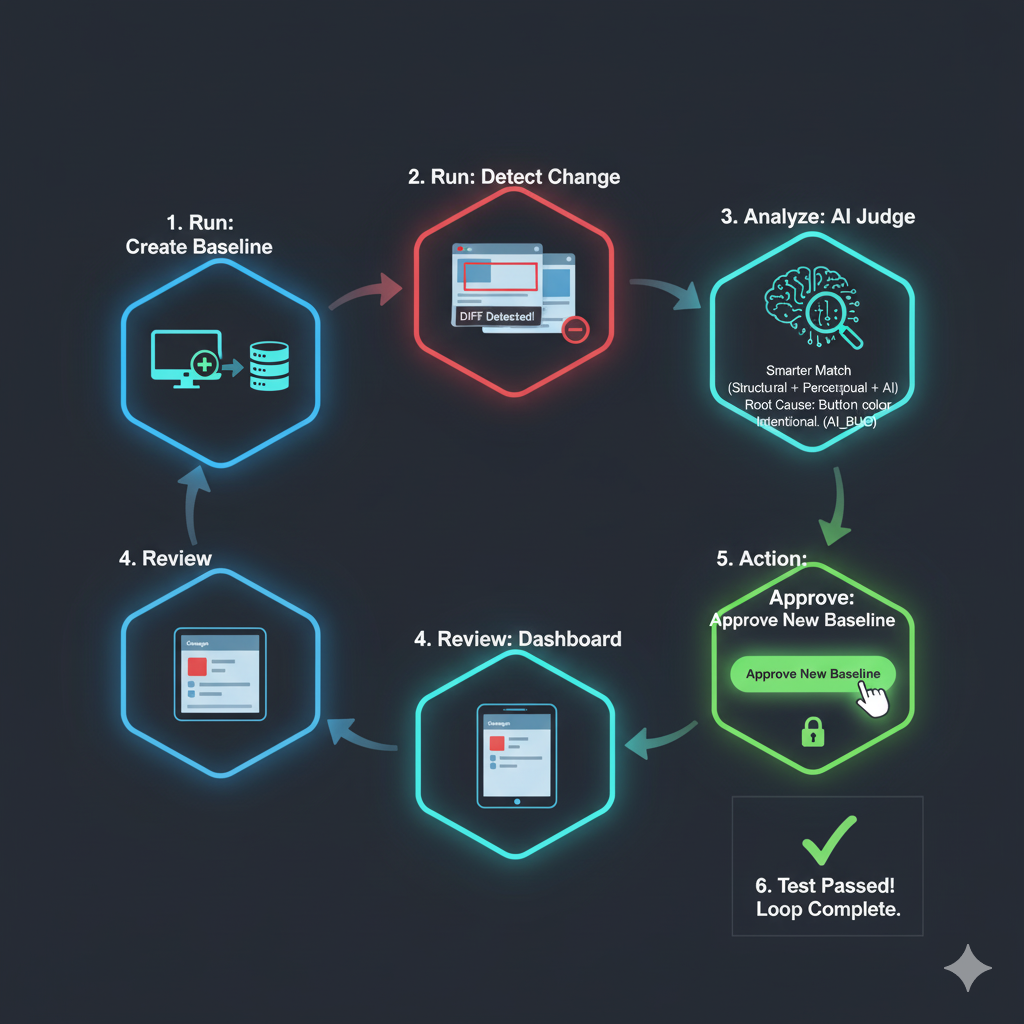
The complete flow from baseline creation to approval
-
1
Run 1: The Baseline is Created
The first time you run your test, the
@testivai/witnesspackage sees that no "golden" baseline exists. It takes a snapshot, captures the DOM, and sends it to the TestivAI API to be stored as the official baseline for this test. -
2
Run 2: A Change is Detected
A developer pushes new code. The test runs again. This time,
@testivai/witnesstakes a new snapshot and compares it to the baseline. It finds a difference.This is the critical part: Instead of sending the full (and sensitive) screenshot, it only sends the small diff image and the isolated DOM snippet of the changed element to our API. Your CI build is immediately unblocked and finishes fast.
-
3
Analysis: The AI Judge Investigates
In the background, our AI Worker picks up the job. It runs the full **Smarter Match** analysis on the diff and the DOM context. It determines if the change is a real bug (e.g., "Button text is overlapping") or a dynamic content change (e.g., "News headline updated") and writes its verdict to the database.
-
4
Review: See Results in the Dashboard
You open the TestivAI dashboard and see the new test run, flagged as
AI_BUG. You see the diff image, the isolated DOM, and the AI's plain-English root cause analysis. There are no pixels to guess at—just clear, actionable results. -
5
Action: Approve the New Baseline
You see the change was intentional (e.g., a button color was updated). You click the "Approve" button in the dashboard. This sends a secure request to our API, marking the snapshot from this test run as the new "golden" baseline.
-
6
Run 3: The Test Passes
The next time your CI pipeline runs,
@testivai/witnessfetches the newly-approved baseline. It performs its comparison, finds no differences, and the test passes instantly. The loop is complete.
Stop Chasing Pixels.
Start Shipping with Confidence.
Join the waitlist for early access.